How to create a work breakdown structure and why you should

How to create a work breakdown structure and why you should
Reading time: about 9 min
Topics:
Rules to create a work breakdown structure
- Include 100% of the work necessary to complete the goal.
- Don't account for any amount of work twice.
- Focus on outcomes, not actions.
- A work package should take no less than 8 hours and no more than 80 hours of effort.
- Include about three levels of detail.
- Assign each work package to a specific team or individual.
It’s your first dive into the world of project management and everyone around you seems to be speaking a different language. Worse than anything, your co-workers hurl acronyms left and right, and there’s not enough time for you to look one up before a new one is casually tossed onto the field—QCD, PMBOK, ACWP, QFD, RBS, SOW, SWOT, FPIF, and WBS.
Mercifully, the deluge stops. But now you are left to ponder over your list. You start at the bottom and think to yourself, “What does WBS stand for?"
In project management, WBS stands for work breakdown structure. This is a foundational tool that will help you to plan, manage, and evaluate large projects, so let’s learn a little bit more.
What is a work breakdown structure?
The name is rather self-explanatory. A work breakdown structure starts with a large project or objective and breaks it down into smaller, more manageable pieces that you can reasonably evaluate and assign to teams. Rather than focusing on individual actions that must be taken to accomplish a project, a WBS generally focuses on deliverables or concrete, measurable milestones. These deliverables may also be called work packages, tasks, sub-tasks, or terminal elements. If you're still unclear on what is a work breakdown structure, it looks something like this:
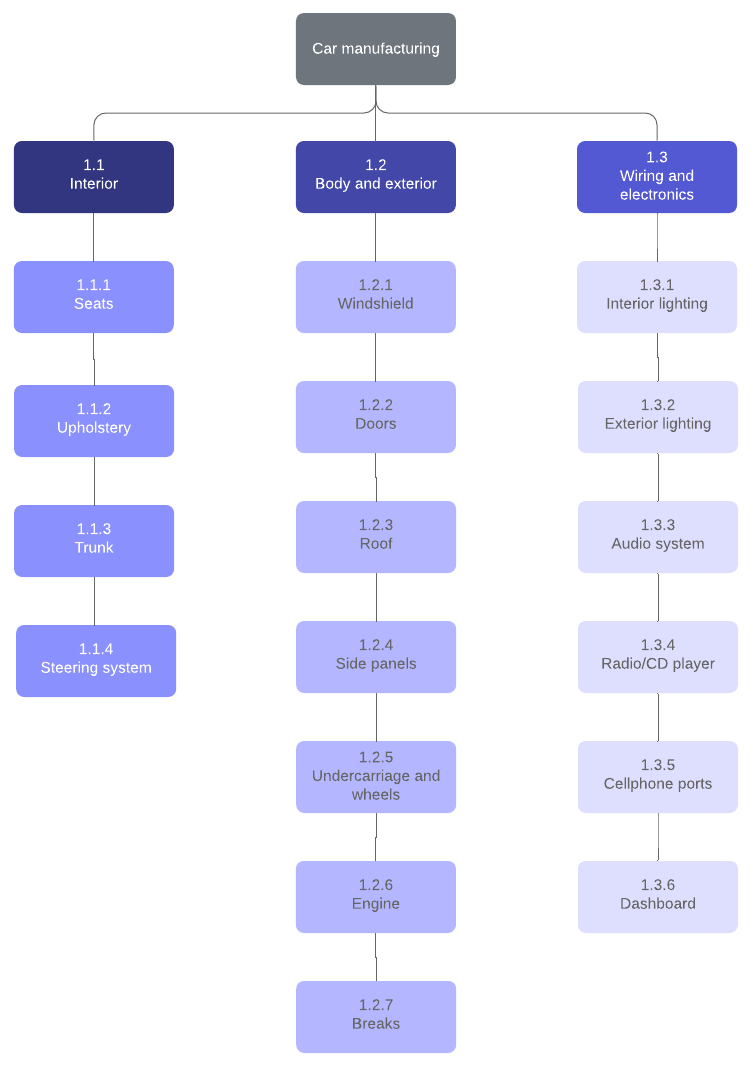
Work Breakdown Structure Example (Click on image to modify online)
A work breakdown structure is a diagram that shows the connections between the objectives, measurable milestones, and deliverables (also referred to as work packages or tasks). The main reason for a work breakdown structure is to make a project more manageable and quantifiable by breaking up the work into smaller tasks.
Why use a WBS in project management?
There are a number of reasons why breaking down a large project is beneficial. It helps you to:
- Estimate the cost of a project.
- Establish dependencies.
- Determine a project timeline and develop a schedule.
- Write a statement of work (or SOW, one of your other acronyms).
- Assign responsibilities and clarify roles (use our roles and responsibilities template to outline duties).
- Track the progress of a project.
- Identify risk.
All of these benefits essentially arise from working with chunks of a project that you can accurately visualize rather than trying to digest and interpret a mysterious and overwhelming task in one fell swoop.
How to create a work breakdown structure
- Define the scope and objectives. Record the overarching objective you are trying to accomplish. This objective could be anything from developing a new software feature to building a missile. Document these details in your project charter. This will be your guiding reference.
- Break it down into key phases and deliverables. Depending on the nature of your project, start dividing by project phases, specific large deliverables, or sub-tasks. Divide the overarching project into smaller and smaller pieces, but stop before you get to the point of listing out every action that must be taken. Remember to focus on concrete deliverables rather than actions.
- Organize deliverables into work packages. Break down each deliverable into all the tasks and sub-tasks required to complete them. Organize the tasks into work packages. Work packages are the lowest level of the breakdown and should define the work, duration, and costs for each task, as well task owners. Each work package should provide assignments that can be completed within a reporting period.
Tips for making a work breakdown structure
As you make a work breakdown structure, use the following rules for best results:
- The 100% rule. The work represented by your WBS must include 100% of the work necessary to complete the overarching goal without including any extraneous or unrelated work. Also, child tasks on any level must account for all of the work necessary to complete the parent task.
- Mutually exclusive. Do not include a sub-task twice or account for any amount of work twice. Doing so would violate the 100% rule and will result in miscalculations as you try to determine the resources necessary to complete a project.
- Outcomes, not actions. Remember to focus on deliverables and outcomes rather than actions. For example, if you were building a bike, a deliverable might be “the braking system” while actions would include “calibrate the brake pads.”
- The 8/80 rule. There are several ways to decide when a work package is small enough without being too small. This rule is one of the most common suggestions—a work package should take no less than eight hours of effort, but no more than 80. Other rules suggest no more than ten days (which is the same as 80 hours if you work full time) or no more than a standard reporting period. In other words, if you report on your work every month, a work package should take no more than a month to complete. When in doubt, apply the “if it makes sense” rule and use your best judgment.
- Three levels. Generally speaking, a WBS should include about three levels of detail. Some branches of the WBS will be more subdivided than others, but if most branches have about three levels, the scope of your project and the level of detail in your WBS are about right.
- Make assignments. Every work package should be assigned to a specific team or individual. If you have made your WBS well, there will be no work overlap so responsibilities will be clear.
Work breakdown structure example
As you are thinking about how to make a work breakdown structure, let’s look at an example. This is a work breakdown structure for building a house.

Notice how the rules of building a WBS are applied in this example. First, the house building project is subdivided into three large sections: foundation, exterior, and interior. Those sections are further subdivided into one or two more levels for a maximum of three levels. The effort needed to build a house has been allocated across all of the work packages for a total of 100% effort. There is no duplication of work represented in this diagram. To further enhance this diagram, you could add the budget for each work package and assign a team.
Work breakdown structure formats
When creating a work breakdown structure, you can choose from several different format options, such as a hierarchical table, an outline or numbered list, a tabular view, or a tree diagram. The example above uses a tree format, which is the most visual option. It structures the WBS like an org chart and shows the hierarchy of tasks, providing space for additional information about each work package.
Outline structure
A text outline is the simplest WBS format. It is easy to put together and shows the hierarchy of tasks. However, it is difficult to add additional information about budget, duration, and assignment using this format.
Build a House
1 Foundation
1.1 Excavate
1.1.1 Dig
1.1.2 Level
1.2 Frame
1.3 Concrete
1.3.1 Pour
1.3.2 Cure
2 Exterior
3 Interior
Hierarchical structure
This format is less visually intuitive but shows the hierarchy of tasks. Because it is a table, this format fits easily onto a page.
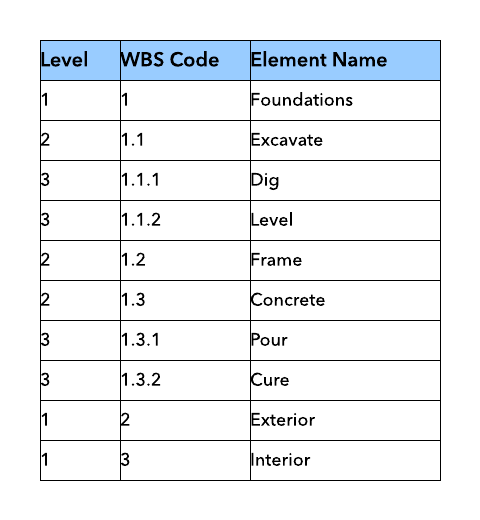
Tabular view
A tabular view is a more visually intuitive way to show hierarchy using a table.

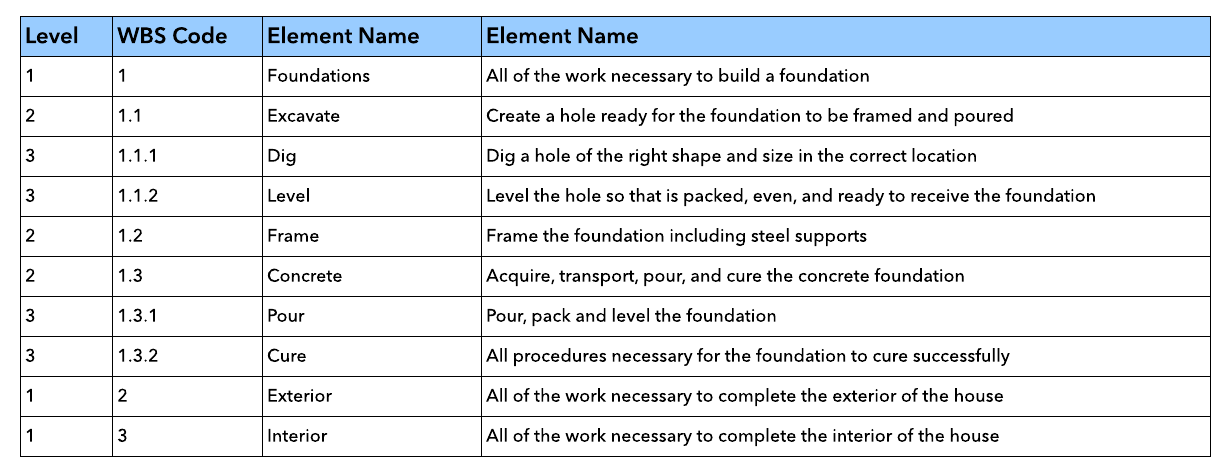
WBS dictionary
What is a WBS dictionary? A WBS dictionary is formatted like the hierarchical structure, but it includes a brief description of each work package. When documenting a project, a WBS dictionary is often included in addition to a visualization of the WBS. It helps to clarify the scope of each task so that all team members understand their responsibilities.
Work breakdown structure template
To get you started, here are a number of work breakdown structure templates you can use. Simply click to open the template, and then customize the information, layout, and design.
Work breakdown structure chart
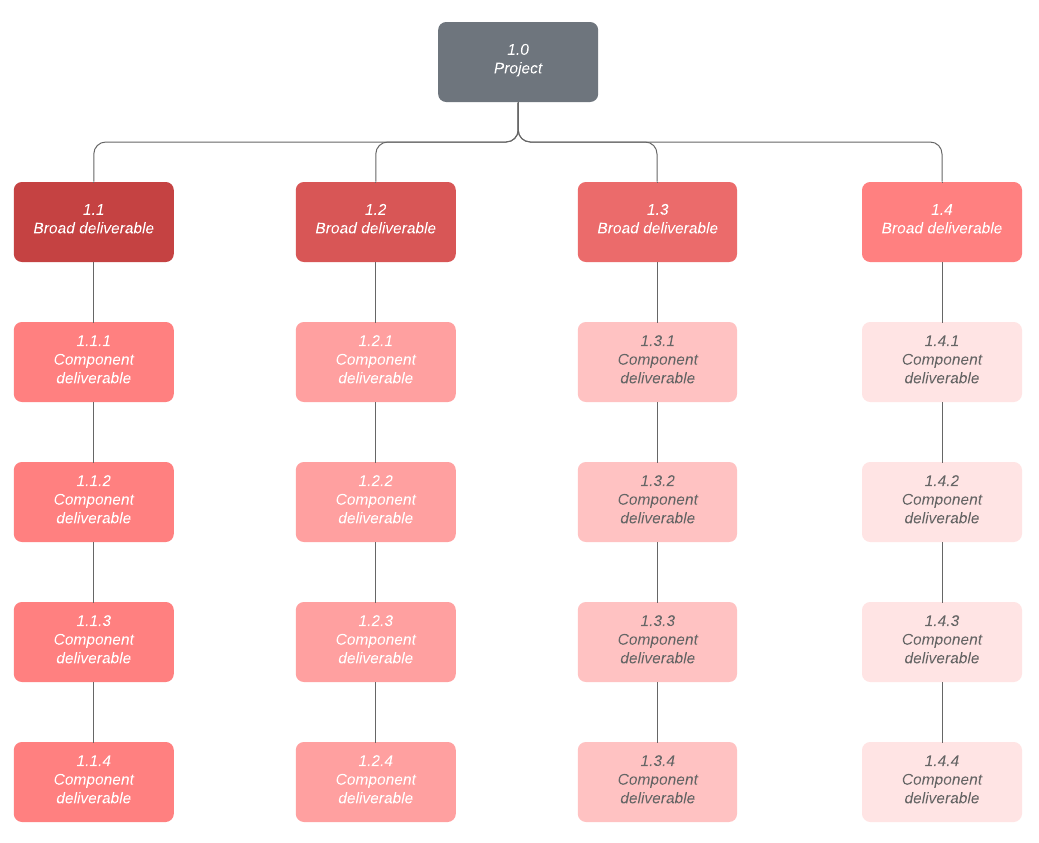
Work Breakdown Structure Template (Click on image to modify online)
How to make a work breakdown structure in Microsoft Office
Work breakdown structures and WBS dictionaries are often included as part of a larger set of documentation or data analysis made using Microsoft Office. The best way to put a WBS into Word or Excel is to use Lucidchart and its free integrations with MS Office. Build your diagram in a software optimized for diagrams, and leave the words and data crunching to Microsoft. Just follow the steps below:
1. Register for a free account with Lucidchart.
2. To make a work breakdown structure in Excel, install the free Lucidchart add-in for Excel.
- Install the free Lucidchart add-in for Word to create a WBS in Word.